 KIND BIZ
Terms in email, decisions in chat, numbers in a spreadsheet
You open three apps to check one thing, and lose your train of thought while you search.
 KIND WORK
Gather it all in one place. KAI answers with sources.
First month ₩0. From ₩15,000 per seat per month · 3-seat minimum · VAT excluded

Sound familiar?
Files, decisions, and meeting notes end up scattered everywhere.
You open three apps to check one thing, and lose your train of thought while you search.
All that is left are everyone’s own notes. Who agreed to do what by when only comes up again at the next meeting.
An AI that doesn’t know your company has to be told everything, and it’s hard to tell which document an answer came from.
KIND WORK solves all three in one account.
See how it works ›How it works
Sign up and your company workspace opens. Upload files and KAI reads them.
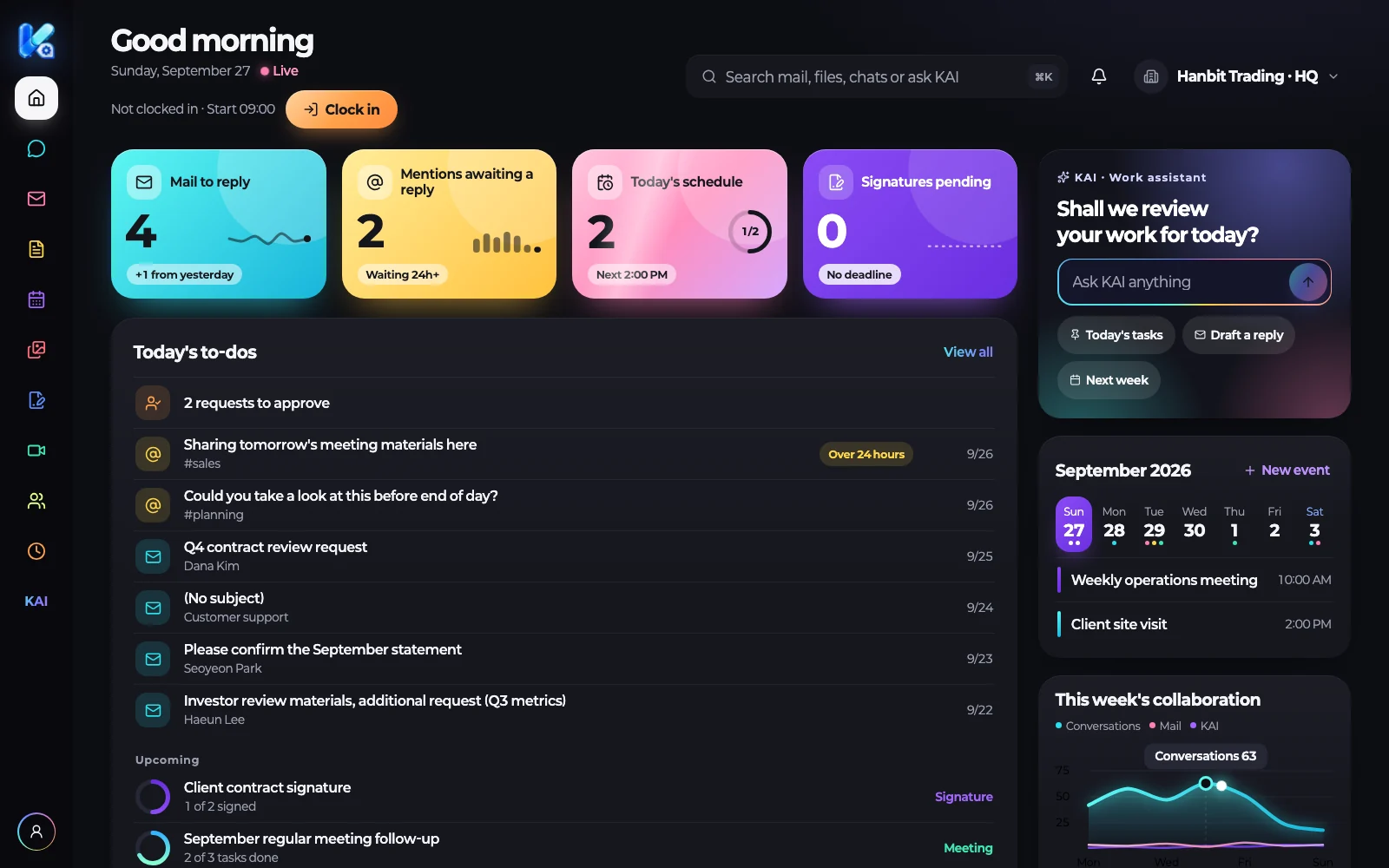
Sign in with one account and the home screen starts with today’s to-dos. Chat, files, calendar, and meetings continue on the same screen.
KAI finds and reads only what you can see in chats, files, calendar, and organizes it into tables and charts.
Click a source on an answer to open the original. Actions like creating a meeting happen only after you confirm.
Features
If Windows shows a protection notice the first time you run it, choose “More info”, then “Run anyway”.
Chat, files, calendar, meetings, and KAI sit in one left sidebar. Home is “Today”: mentions waiting for a reply, today’s events, recent files, and meeting follow-ups come first.
Keep work conversations going in team channels and direct messages, and gather documents in your company’s own folders to share with the team.
KAI finds what you can access in chats, file contents, spreadsheet cells, calendar, and organizes it into tables and charts. Totals and counts are calculated from the source cells, never guessed.
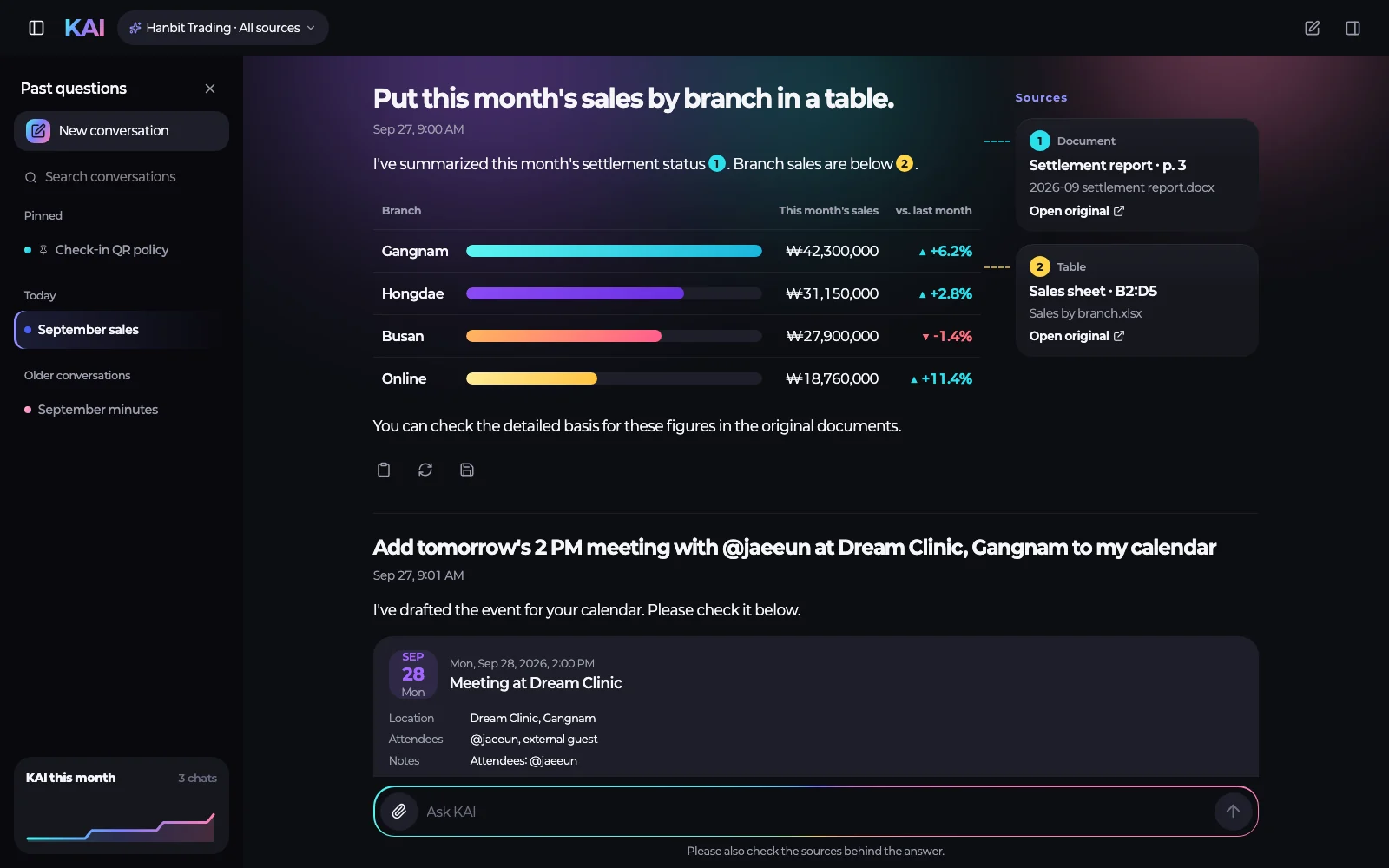
Answers drawn from company material carry [1] [2] source chips. Click one and the original opens, with your access and the version checked again at that moment.
Mail arrives sorted into People, Notifications, and Newsletters. Open mail from a person and KAI summarizes it. A reply draft only goes into the compose window; you press send.
Once the host confirms participants’ consent and starts recording, the audio is transcribed and KAI drafts minutes: decisions, proposals, open items, and owners with due dates.
Say “Set up a sales meeting next Tuesday morning” and KAI shows a meeting plan. Confirm it, and the video meeting room and the calendar event are created together.
Clock in and out, and today’s timeline and this week’s hours add up. Request leave against the days you have left, in half days (0.5), and a manager or admin approves or declines.
One language setting changes the screen, KAI’s answers, and notifications. Five languages are supported: Korean, English, Japanese, Simplified Chinese, and Traditional Chinese.
KAIInvite staff by email and set their role, department, and title. Once they accept, they can use files, chat, and KAI right away.
Employees sign in with their company accounts. An administrator verifies ownership of the company email domain and completes setup.
The audit log records admin actions in the company by time, actor, target, and result. A company owner searches by period and action and exports to CSV.
Try it with a ₩0 first month.
3-seat minimum · From ₩15,000 per seat (VAT excluded) · Cancel yourself in Settings
Trust
KAI finds, organizes, and shows plans. People decide what gets created and confirmed.
Get started
Create your company and the workspace is prepared automatically, no card needed. It usually takes about a minute.
Start with email, Google, or Kakao, whichever suits you. For email, click the link in the confirmation message. You agree to the terms of use and privacy policy.
Just the company name and a contact name and phone. No plan, headcount, or card. Business registration number is optional.
The file space and chat team are created automatically, and the company opens once the connection checks out.
Do it on the billing screen any time during the free month. Choose the plan and seats there, check the first payment date and amount, then agree to recurring payment. The first charge is on the day the free period ends.
Usually about a minute · continues if you close the screenPricing
KAI is included in both plans. All amounts exclude VAT.
The basic set: chat, files, calendar, meetings, and KAI, ready to use
per seat / month · 3-seat minimum
For companies that need organization controls, security, and priority support
per seat / month · 3-seat minimum
Choose a plan and the number of seats to see the monthly price right away.
Add a card during the free month and, on the day it ends, the next month, ₩165,000 (VAT included), is charged in advance, then on the same day every month.
300GB storage included
The admin is emailed before each stage. Once a card is registered and payment goes through, restrictions lift immediately.
| Item | Standard + KAI | Business + KAI |
|---|---|---|
| Price per seat (monthly, VAT excluded) | ₩15,000 | ₩25,000 |
| Minimum seats | 3 seats | 3 seats |
| Included storage (per person, shared) | 30GB | 100GB |
| Storage overage | ₩10,000 per 100GB per month | ₩10,000 per 100GB per month |
| Chat, files, calendar, meetings | Included | Included |
| KAI (questions, summaries, sources) | Included | Included |
| SSO (SAML) | Not included | Included |
| Audit log | Not included | Included |
| Priority support | Not included | Included |
| Dedicated GPU server | Not included | Option · ₩800,000 per month · after consultation |
Proof
Things you can check with your own eyes before you sign up.
Read the terms of service, privacy policy, recurring payment consent, and cancellation and refund policy before signing up. All come in five languages.
The payment history table shows date, usage period, amount, and status, and you open receipts yourself. The ₩0 first month shows up there too.
Compare
Your current mix of tools, side by side with KIND WORK.
| Item | Today | KIND WORK |
|---|---|---|
| Accounts | Accounts, invitations, and permissions managed in each tool | One account for chat, files, calendar, meetings, and KAI |
| Finding material | Search each app separately | KAI finds what you can see across chats, files, calendar in one go and organizes it with sources |
| Basis for an answer | Dig up which document it came from | Source chips on answers from company material; click to read the original |
| Meeting records | Take notes or write them up separately | Recording (after consent), transcript, and draft minutes, confirmed after review |
| New staff | Invite in each tool | One email invitation, and add seats after confirming if you run out |
| When someone leaves | Revoke access tool by tool | One “Revoke access” also takes away chat and file access |
| Cost | Separate subscriptions per tool | From ₩15,000 per seat per month (VAT excluded), KAI included, 30GB storage per person |
| Starting and cancelling | Sign up, pay, and cancel in each tool | Self-serve sign-up (workspace ready in about a minute), and an admin cancels in Settings |
Security & data
Exactly as written in the privacy policy and terms of service.
Every company gets its own file space and chat team. Users of other companies don’t show up in search, and chat and file sharing stay within the same company.
KAI cites only material the asker is allowed to open. Admins decide who can search the company mailbox.
Actions like creating a meeting or adding an event are never confirmed by KAI on its own, but only after you press the confirm button.
The host starts it, and once it starts every participant’s screen shows it. Transcription uses our own speech recognition, and the original audio is deleted after transcription.
Chat, files, calendar, meeting material, and the KAI search index live on servers in South Korea run directly by Kind Doctor Inc. Traffic is encrypted with TLS (HTTPS).
Card numbers and security codes never pass through KIND WORK servers; the payment processor handles them directly. When a subscription ends, the card registration is cancelled and deleted.
Who did what is recorded and cannot be edited or deleted. The viewing screen and company SSO (SAML) are on Business + KAI.
The customer owns its data, and we don’t use or sell it for anything beyond providing the service. After cancellation we keep it for 90 days and notify you before deleting.
FAQ
No card is needed to start. For the first month from the day you create your company you use every Business + KAI feature for ₩0, once per company.
We email the admin 7 days and 1 day before it ends. To keep using it, add a card on the billing screen before then; on the last day the next month is charged in advance to that card. Cancel before then and nothing is charged.
An admin cancels directly in Settings, on the billing screen. There are no sign-up, setup, or cancellation fees.
Cancellation takes effect when the paid period ends, so everything keeps working until then, and the remaining period is not refunded. Before it takes effect, you can undo the cancellation and keep going. The same applies to the remaining months of yearly billing.
The minimum is 3 seats, so you are billed for 3 seats even with fewer than 3 people.
If you invite beyond your seats, you are asked first whether to add more. Added seats work right away, and the fee applies from the next billing. With yearly billing they are settled for the remaining months at the next yearly payment.
Reducing seats takes effect from the next billing period, and you can’t go below the number of people in use.
No. When a payment fails, the admin is notified by email and at the top of the screen, and you keep using it as usual for 7 days.
Then it is read-only for 30 days (viewing, search, and KAI questions work; uploading, writing, inviting, and creating meetings don’t), and after that it is suspended. Register the card again and once payment goes through, restrictions lift immediately.
Answers drawn from company material carry sources, and clicking a source opens the original. Your access and the version are checked again when it opens.
If the original changed after the answer, KAI says “This may differ from the current content,” so you can check any mistake against the original right away.
KAI’s answers can be wrong, so base important decisions on the original. Actions like creating a meeting or adding an event happen only after you confirm.
KAI cites only material the asker is allowed to open. Each company has its own file space and chat team, so other companies’ material never shows up.
A connected company mailbox is searched only within the range the admin sets: admins only, or all members.
KAI reads the chats, files, calendar inside KIND WORK, and the company mailbox an admin connects. It doesn’t read conversations from other messengers you use now.
Drag and drop your existing documents to upload them. For mail, there is no new mail server: you just connect the company mail account you already use.
For 90 days from the day you can no longer use the service, through cancellation or suspension, your data is kept. In that period an admin can email contact@k-biz.ai and we provide an export file within 5 business days.
After 90 days the data is deleted and cannot be recovered, and we email the admin before deleting.
Right after self-serve sign-up, no signing server is set up automatically. If you need it, ask the support team (contact@k-biz.ai) and we will set it up together with your company forms.
The screens, KAI’s answers, and notifications support five languages: Korean, English, Japanese, Simplified Chinese, and Traditional Chinese.
Sign-up and payment happen on the web only. The mobile app shows no payment screen; sign up on the web, then log in on the app.
No card to start · first month not charged · 3-seat minimum · from ₩15,000 per seat (VAT excluded)
Already using it? Log in ›