 KIND BIZ
Inquiries during a treatment
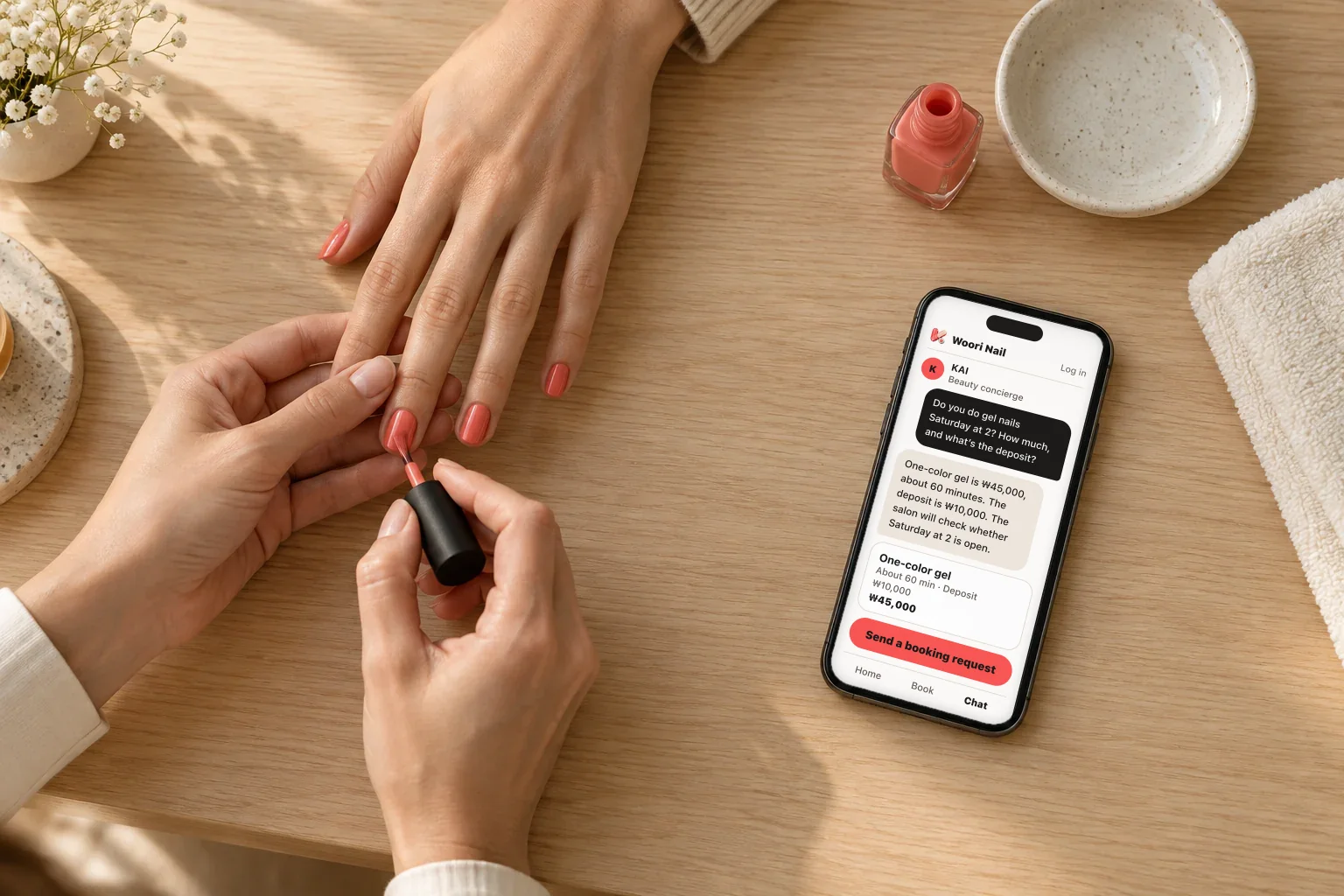
With your hands tied up, you can’t read a message right away. The same questions — price, time, deposit — get the same answer, typed out again each time.
 KIND BEAUTY
KAI answers inquiries first. The salon confirms bookings.
For nail, lash, and skin care salons, it carries booking requests all the way through to the deposit payment.
From ₩300,000 a month, plus a fee on each completed deposit payment
What you miss today
Three moments almost every solo or small salon knows.
With your hands tied up, you can’t read a message right away. The same questions — price, time, deposit — get the same answer, typed out again each time.
Inquiries come in through KakaoTalk, Naver Talk Talk, and Instagram DMs, and dates and times get buried in the chat. Whether a deposit arrived is checked somewhere else.
Once the treatment is over, the next message depends on memory. Reaching out first to someone who is due back is easy to put off.
KIND BEAUTY ties these three moments into one flow.
How it works
Customers ask and request on the customer page, and you check in between treatments.
They ask KAI on the customer page about price, time, and deposit. KAI answers from the information your salon has set up.
Woori NailLog inDo you do gel nails Saturday at 2? How much, and what’s the deposit?
One-color gel is ₩45,000, about 60 minutes. The deposit is ₩10,000. The salon will check whether Saturday at 2 is open.
Send a booking requestThey leave a service, a preferred date and time, and contact details. It reaches you as a single booking request.
Woori NailSend a booking request
You check availability and send the deposit details. Once the customer pays, you save the date and time to confirm.
One-color gel · 010-1234-****
Features
From the way customers find you to the way they come back — eight things.
01 · Customer page
Menu, prices, a review summary, and your location on one page. Customers move between Home, Book, and Chat — and a shared link opens Chat first.
Woori NailLog inOnce a time is confirmed available, the deposit details follow and the booking is confirmed.
Services and deposit
02 · KAI consultation
KAI is set up to answer from the services, prices, duration, and deposit you’ve organized and the price lists and guides you’ve uploaded. It doesn’t invent open slots or discounts — when it doesn’t know, it says the salon will check and follow up.
Hi, this is Woori Nail. Tell us the look or concern you have in mind and we’ll guide you through services and deposits.
Price of the monthly art?
The monthly art is ₩55,000, about 90 minutes, with a ₩10,000 deposit. Leave the date and time you’d like as a booking request.
03 · Connect
First-reply messages are ready for KakaoTalk channel, Naver Talk Talk, Instagram DM, text, and email. Paste one into your auto-reply and customers follow the link to ask KAI.
Where to paste itKakaoTalk channel admin: auto-reply or welcome message
Hello, this is Woori Nail.
Replies can be slow during treatments. KAI can help right away with prices, duration, availability, and deposit details.
Leave the service and time you’d like on our customer page below.
https://k-biz.ai/woori-nail
Where to paste itNaver Talk Talk admin: auto-reply or away message
Hello, this is Woori Nail.
You can see prices, duration, availability, and deposit details on our customer page below. KAI helps first, and when a booking request comes in, the salon checks it.
https://k-biz.ai/woori-nail
Where to paste itInstagram professional account: quick reply
Thanks for your DM — this is Woori Nail.
Replies can be slow during treatments. KAI will help first with prices, duration, and availability.
Ask about the service you’re interested in at the link below.
https://k-biz.ai/woori-nail
Where to paste itTexting app saved message or a bulk-text service
This is Woori Nail. For prices, duration, and availability, please check our consultation page below.
https://k-biz.ai/woori-nail
Where to paste itEmail signature, auto-reply, or reply template
Hello, this is Woori Nail.
Thank you for getting in touch. KAI is on our customer page to help right away with prices, duration, availability, and deposit details for each service.
Leave the service and time you’d like at the link below.
https://k-biz.ai/woori-nail
For bookings that need checking, the salon will follow up.
04 · Booking requests
When a customer leaves a service, a preferred date and time, and contact details, it becomes one booking request. You check availability and send the deposit details; once it’s paid, you save the date and time to confirm.
One-color gel
One-color gel
Monthly nail art
05 · Deposits
Set the deposit and a message with the payment link is generated. Paste it into KakaoTalk, Naver Talk, Instagram DM, or a text and the customer pays by card.
Hello, this is Woori Nail.
Kim ○○, here are the details for the ₩10,000 deposit on One-color gel.
Once you finish paying at the link below, we’ll send your booking confirmation.
Payment link₩10,000
06 · After the visit
Record a completed visit and a review request and a return-visit message are prepared together; the return visit is due 4 weeks later. The owner sends them: copy, paste into KakaoTalk or a text, then record it as sent.
4weeks
It’s about time for another treatment. Can we help you find a time for your next visit?
07 · Setup from links
From your Naver Place link it reads the intro, hours, menu, prices, photos, reviews, and location. Connect Instagram for photos and reel cover images; add a YouTube channel link for public videos. Changes are checked on the schedule you pick: 3 days · 7 days · 14 days.
Woori NailCheck every 3 days · 7 days · 14 days (your pick) · default: every 7 days in turn
08 · Owner screen
Booking requests to handle, payments awaiting, and review and return-visit messages are listed together. Keep inquiries, deposits, and visit history per customer, plus notes and tags for next time.
Booking requests and payments to handle next.
Paid the deposit for Sat, Nov 7, 2:00 PM.
Waiting on the ₩10,000 deposit.
A customer left a booking request.
It’s about time for another treatment.
3 booking requests · last visit Nov 7
Note: prefers after-work times, prefers quiet explanations
The application is just salon details, contact, and requests.
People decide
Confirming a booking, setting a deposit, issuing a refund — all yours.
Open slots, discounts, staff schedules, and policies you haven’t set are never decided by KAI. It tells the customer the salon will check, and the customer leaves a preferred time as a booking request.
Any openings at 6 tonight?
The salon needs to check open times. Leave your preferred time as a booking request and we’ll get back to you.
Send a booking requestGetting started
You can note a start date on the application, and an operator reviews it and gets in touch.
Enter your salon name, customer page address, business type, and contact details. The application takes about 3 minutes.
A KIND BIZ operator reviews your application and gets in touch.
Use the invitation link the operator sends and enter only your name, email, and password.
Organize services, prices, and deposit and cancellation notes, and check your payout account and payment connection. Add a Naver Place link and menu candidates are read in.
Once approved, your customer page and deposit payments open. Nothing is public before approval.
Shop info → Contact → Requests
Deposit payments open once your payout account and payment connection are confirmed.
Pricing
A monthly fee, plus a fee only on deposits that are paid.
| Item | StandardFocused on customer consultations in Korea and everyday booking operations. | ProWidens consultations to 14 languages, with a lower fee per booking. |
|---|---|---|
| Monthly fee | ₩300,000 / month | ₩500,000 / month |
| Fee per completed deposit | ₩1,000 each | ₩500 each |
| Consultation languages | Korean first | 14 languages |
Both plans include:KAI consultationBooking requestsCustomer managementDeposit paymentsSettlement report
KAI consultation quality is the same on both plans.
| Completed deposits | Standard | Pro |
|---|---|---|
| 50 payments | ₩350,000 | ₩525,000 |
| 200 payments | ₩500,000 | ₩600,000 |
| 400 payments | ₩700,000 | ₩700,000 |
| 600 payments | ₩900,000 | ₩800,000 |
At 400 completed deposits a month the two plans cost the same; above that, Pro costs less.
Billing timing and cancellation terms are explained in the sign-up consultation.
See for yourself
What KIND BEAUTY does stays visible on your owner screen.
What customers ask and what KAI answers is kept, along with the service it recommended.
Customer asked Price of the monthly art?
KAI answered The monthly art is ₩55,000, about 90 minutes…
Recommended: Monthly nail artFrom the request to confirmation, who did what is listed in the booking request’s history.
Only deposits that have actually been paid are recorded as paid. Refunds are recorded in the payment history.
PaidDeposit ₩10,000 · One-color gel
Still refundableIssued from the owner account with an amount and reason
Compared with today
Your current tools stay as they are. Only the repeated work goes away.
| Item | Replying by DM, phone, and text alone | KIND BEAUTY |
|---|---|---|
| Inquiries mid-treatment | You wait until your hands are free and answer the same question again each time. | KAI answers price, time, and deposit first and passes anything the salon needs to check on as a booking request. |
| Booking requests | You dig through chats for dates, times, and contact details and copy them over. | Service, preferred date and time, and contact details arrive as one booking request. |
| Deposits | If you take a deposit, you check for the transfer yourself. | A message with the payment link is generated, and completed card payments are recorded. |
| Customer records | Left to a notepad or memory. | Inquiries, deposits, and visit history per customer, with notes and tags. |
| Return visits | You reach out when you remember. | A return-visit message is prepared when a visit is completed, due 4 weeks later. The owner sends it. |
| Your current tools | You keep using them. | Start while keeping them. Your channels only get the customer page link. |
| What people decide | You do everything yourself. | Confirmations, deposits, refunds, and the messages you send are yours to decide. |
Security · data
How contact details and consultations are handled, stated up front.
Access to personal data is controlled per salon, and permissions are checked every time someone views it.
Customer phone numbers are stored encrypted. The owner’s list shows them masked, like 010-1234-****.
Card numbers and security codes never pass through us; the payment company handles them directly. A payment is recorded as complete only after the payment company confirms it again.
Roles are owner, manager, and staff. Staff can’t open the services, settlement, KAI, and salon settings screens, and only the owner account issues refunds.
Instagram connects through the official account link, so your password is never stored. Stop the YouTube connection and its videos disappear from the customer page and KAI’s materials; files you uploaded can be deleted by you.
The booking history shows whether the customer, the owner, or the system did what. Our personal data processing partners are listed in the privacy policy.
FAQ
The application only asks for salon details, contact, and requests — no payment details.
Pricing is a monthly fee (Standard ₩300,000, Pro ₩500,000) plus a fee only on completed deposit payments (₩1,000 each on Standard, ₩500 on Pro). Billing timing and cancellation terms are explained in the sign-up consultation.
KAI consultation quality and the screens you use are the same on both. What differs is the consultation language (Standard: Korean first, Pro: 14 languages) and the fee per completed deposit (₩1,000 on Standard, ₩500 on Pro).
KAI is set up to answer from the services, prices, duration, and deposit you’ve organized, confirmed salon details, and the files you uploaded.
It doesn’t invent open slots, discounts, staff schedules, or policies; when it doesn’t know, it says the salon will check. If you spot a wrong answer, find it in the consultation history and fix the service or file — later answers follow.
No open-slot calendar is shown. Customers leave a preferred date and time as a request, and you check availability. Once the deposit is paid, you save the date and time to confirm. KAI never confirms a booking.
New requests pile up in “Today’s tasks” and in the booking request list, with the count to handle shown. You open the screen between treatments to check.
You set the deposit by service, and the customer pays by card in the PortOne payment window. Refunds are issued from the owner account with an amount and a reason, and they stay in the payment history.
The settlement report covers Monday to Sunday and shows the deposit total, refunds, the combined fee, and the expected payout, with a CSV download. The expected payout is the deposit total minus refunds and the combined fee.
You can start while keeping your current method. Paste a first-reply message with your customer page link into your KakaoTalk channel, Naver Talk Talk, or Instagram auto-reply, and customers follow the link to talk with KAI.
KAI doesn’t reply directly inside those chats.
Pick only the menu candidates you need and save the price, duration, and deposit; anything it couldn’t read, like hours, stays blank. What you’ve edited stays as you left it at the next check.
You can have it check automatically, or choose to run the check yourself.
Access to personal data is controlled per salon, and contact numbers are stored encrypted. The owner’s list shows them masked, like 010-1234-****, and card numbers and security codes don’t pass through KIND BIZ servers — the payment provider handles them directly. Our processing partners are listed in the privacy policy.
On Pro, the customer screens and KAI’s consultation can be opened in 14 languages. KAI answers in the language the customer picks, and menu descriptions can be generated in 14 languages. The deposit payment page opens in Korean. Standard is Korean first.
Anything else? Add it to the requests field on the application.
Standard ₩300,000 a month, Pro ₩500,000 a month. A fee applies only to deposits that are paid.